Virtual staging is the process of digitally adding furniture, decor, rugs, artwork, and other movable design elements to a real estate photo so buyers can better understand how an empty or under-furnished room could be used. In real estate, virtual staging is mainly used for listing photos, seller presentations, rental marketing, and online property promotion.
It does not replace honest property photography. A good virtual staging workflow starts with the real room, keeps the room structure accurate, and helps buyers visualize the space without hiding defects or changing permanent features.
Key Takeaways
- Virtual staging means digitally furnishing a real estate photo, usually for an empty or lightly furnished room.
- The goal is to help buyers understand room function, scale, and potential before they visit the property.
- Virtual staging should not change walls, windows, floors, room dimensions, views, built-in fixtures, or material property conditions.
- Agents should keep original photos, review before and after versions, and disclose staged images when required by MLS, brokerage, portal, or local rules.
- AI tools can make virtual staging faster and more affordable, but every result still needs human review before publishing.
- For pricing details, compare image previews, HD exports, revisions, and workflow costs in the virtual staging cost guide.
What Is Virtual Staging?
Virtual staging is a digital real estate photo editing method that adds realistic furniture and decor to a room photo. Instead of moving physical sofas, beds, tables, art, lamps, and rugs into the property, virtual staging places those items into the image.
The input is usually a vacant room photo. The output is a staged version of the same room that shows a possible use for the space.
For example, a blank living room can become a warm seating area with a sofa, coffee table, rug, side table, plant, and wall art. A spare bedroom can become a guest room or home office. A basement can become a media room, flex room, or family space.
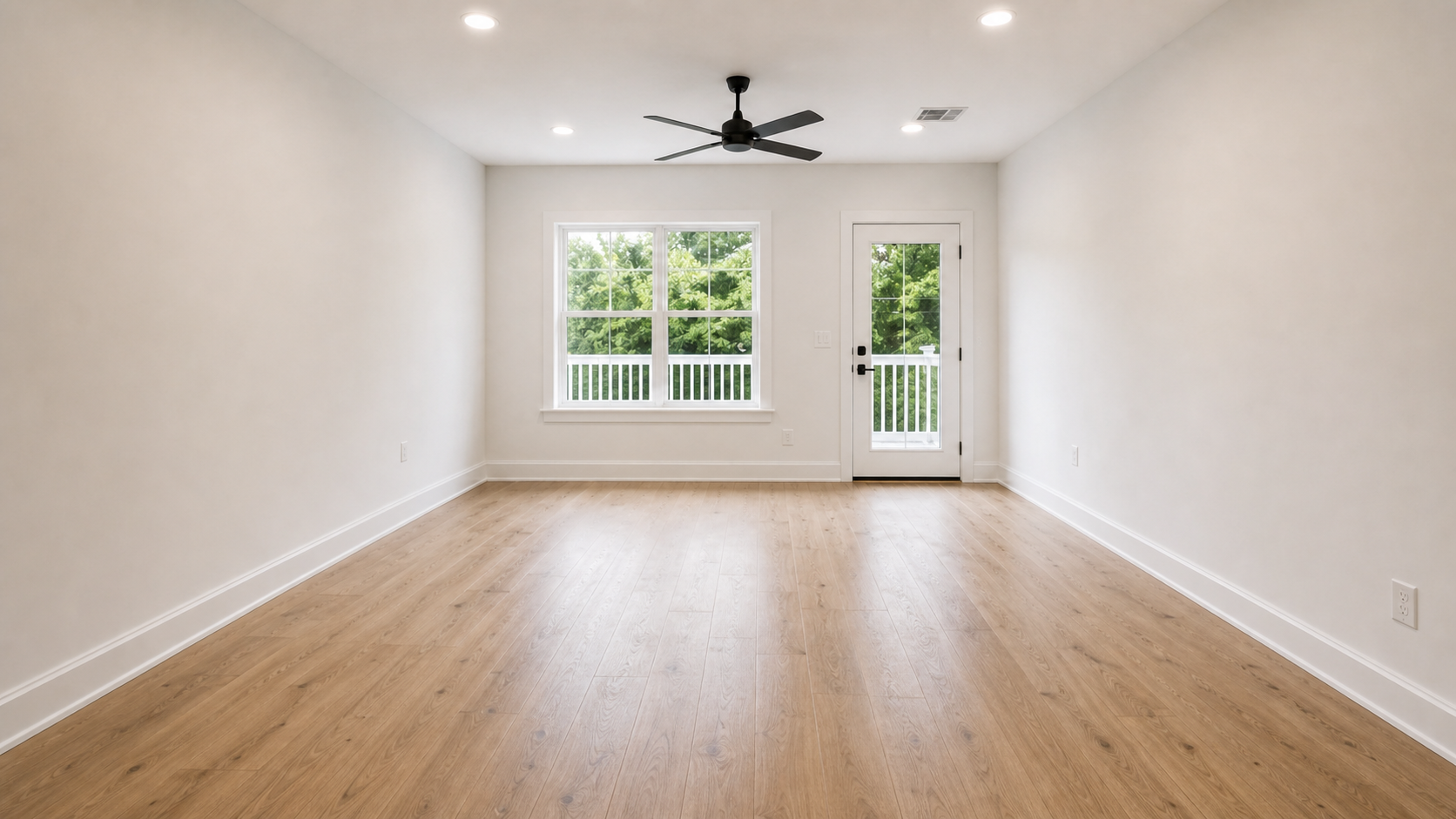
Virtual staging starts with the actual room. The original photo remains important for review, disclosure, and buyer trust.
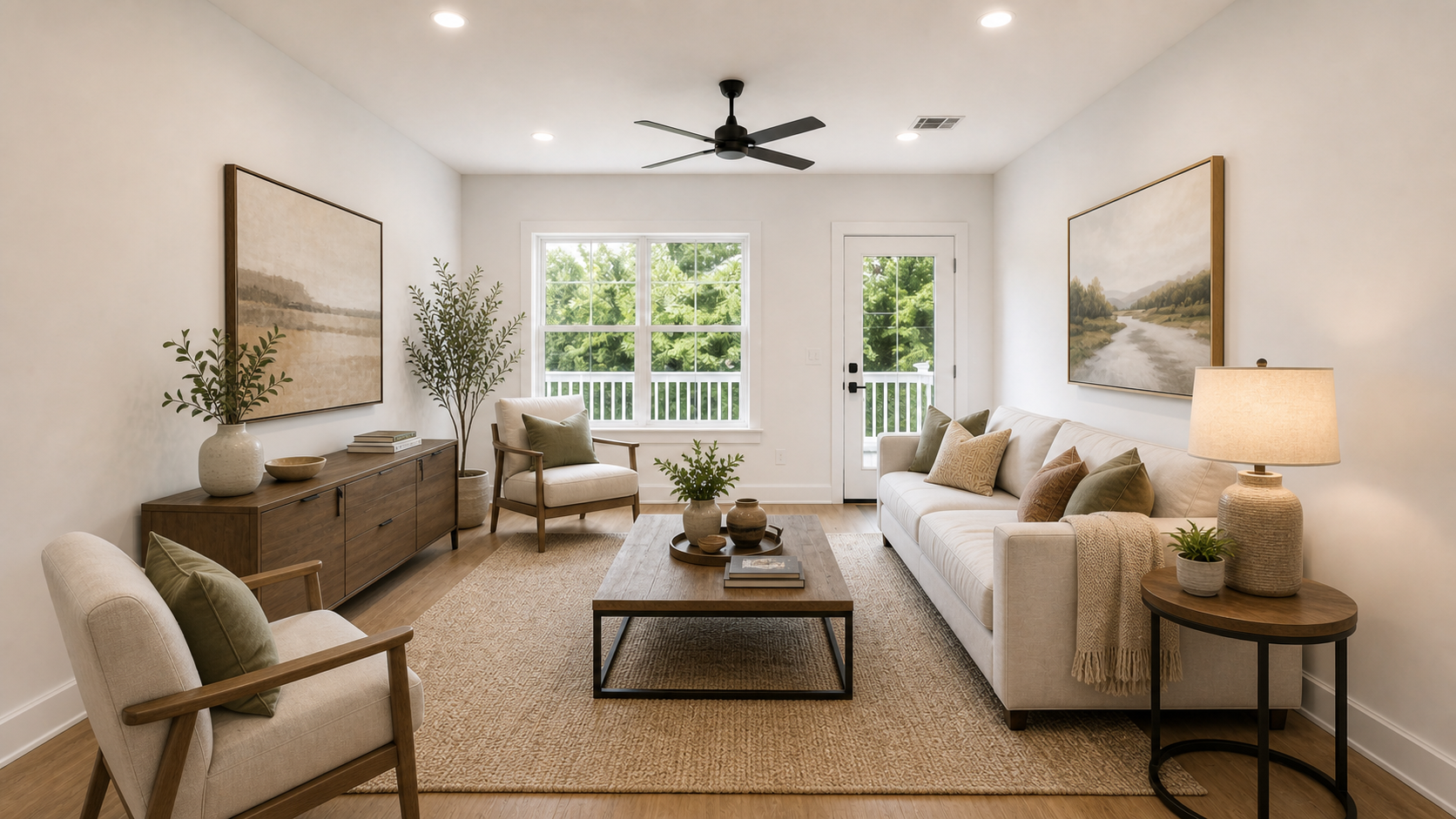
The staged version should make the room easier to understand without changing the property itself.
Virtual staging is different from general photo enhancement. Brightness, color correction, crop adjustment, and sharpening improve the same photo. Virtual staging adds design elements to show potential use. It is also different from renovation rendering, which may change flooring, cabinets, walls, fixtures, or layouts. For listing photos, those deeper changes create much higher disclosure and accuracy risks.
What Is Virtual Staging in Real Estate?
In real estate, virtual staging is used to improve how a property is presented online while keeping the listing workflow practical.
Real estate agents use it when a vacant room looks cold, hard to size, or difficult to understand from photos alone. Real estate photographers may offer it as an add-on. Property managers use it to show how a rental could feel when furnished. Home sellers use it to preview how a room could look before investing in physical staging.
The most common real estate use cases are:
| Use case | Why virtual staging helps |
|---|---|
| Vacant living room | Shows seating layout and lifestyle potential |
| Primary bedroom | Helps buyers understand bed placement and scale |
| Dining area | Clarifies how the space supports meals or entertaining |
| Flex room | Shows whether the room works as an office, guest room, or media room |
| Rental unit | Makes an empty apartment feel easier to imagine furnished |
| Seller presentation | Shows a homeowner how staging may improve online marketing |
The important phrase is "real estate photo." Virtual staging is not just interior design art. The image still represents a property that buyers may tour, inspect, and compare against the listing. That is why accuracy matters as much as visual appeal.
How Does Virtual Staging Work?
A typical virtual staging workflow has six steps.
1. Start with a clear room photo
Use the real listing photo. The room should be well lit, straight enough to understand, and not blocked by too much clutter. Wide-angle shots can be useful, but extreme distortion can make furniture scale harder to review.
2. Choose the room type
The room type tells the tool or designer what the final room should become. Common options include living room, bedroom, dining room, office, kitchen-adjacent space, basement, bonus room, or patio.
Room type is not just a label. It controls what furniture belongs in the image. A bedroom needs a bed and nightstands. A living room needs seating. A dining room needs a table and chairs. A home office needs a desk, chair, storage, and usable working space.
3. Choose a staging style
Style controls the design direction. Real estate staging styles are usually broad and buyer-friendly: modern, luxury, Scandinavian, coastal, farmhouse, minimalist, mid-century modern, or warm neutral.
The style should fit the property, price point, neighborhood, and likely buyer. A modest rental may not need luxury staging. A high-end listing may need more refined furniture and lighting. The best style is not always the most dramatic style.
4. Generate or order the staged image
AI virtual staging tools can generate a preview quickly. Manual virtual staging services usually involve a designer preparing a finished edit. Both approaches should preserve the original room structure, camera angle, windows, walls, floors, built-ins, and permanent features.
You can try this workflow on the AI virtual staging tool by uploading a room photo, choosing a room type, and selecting a style.
5. Review before and after
Do not publish a staged result just because it looks polished. Review it against the original photo.
Check whether:
- furniture scale matches the room;
- shadows and perspective look natural;
- walls, windows, flooring, doors, and fixtures remain unchanged;
- the staged room function makes sense;
- the image still looks like a real listing photo;
- the original photo is saved and easy to access.
6. Export, disclose, and reuse
Once the image is approved, export the version you need for listing marketing. Some workflows separate watermarked previews from HD no-watermark exports. If you need listing copy or follow-up emails after the image is ready, connect the staged image to downstream assets such as real estate email templates.
Virtual Staging vs. Virtual Home Staging
Virtual staging and virtual home staging usually mean the same thing in search behavior. Both refer to digitally furnishing a room photo to help people imagine the home.
The slight difference is emphasis:
- "Virtual staging" is the broader industry term.
- "Virtual home staging" is often used by sellers, homeowners, and consumer-facing content.
- "Virtual staging in real estate" is the clearest phrase for agents, brokers, photographers, and listing marketers.
For StageListingPro, the real distinction is not the phrase. It is the use case. The product is built for real estate listing photos and listing marketing workflows, not for casual room decoration images.
Is Virtual Staging Worth It?
Virtual staging can be worth it when the image helps buyers understand a room that would otherwise feel empty, confusing, or less appealing online.
It is often useful for:
- vacant homes;
- empty rental units;
- new construction with unfurnished rooms;
- awkward flex spaces;
- rooms where scale is hard to judge;
- seller presentations where the agent wants to show marketing potential;
- agents who need fast listing visuals before physical staging is practical.
It may not be worth it for every photo. If a room is already furnished well, if the source photo is poor, or if the property will rely heavily on in-person showings, virtual staging may be only one part of the plan.
The best way to evaluate value is to ask whether the staged image helps the buyer understand the real room more clearly. If it only makes the photo look impressive while creating unrealistic expectations, it is not doing the right job.
Does Virtual Staging Help Sell a House?
Virtual staging can support a listing, but it should not be described as a guaranteed way to sell a house faster or for more money.
The practical benefit is simpler: staging can make it easier for buyers to visualize how a space could function. The National Association of REALTORS reported in its 2025 Profile of Home Staging that many buyers' agents said staging helped buyers visualize a property as a future home.
Virtual staging applies that same idea to online listing photos. It can help a buyer understand where furniture might go, how a room could feel, and why an empty space deserves attention. But price, location, condition, market timing, photography quality, and agent strategy still matter.
Use virtual staging as a listing presentation tool, not as a promise.
Is Virtual Staging Legal?
Virtual staging is commonly allowed, but rules vary by MLS, brokerage, portal, state, and local market. Agents should check their own rules before publishing.
A conservative operating standard is:
- keep the original photo;
- label staged or AI-enhanced images when required;
- disclose in captions, image labels, public remarks, or agent remarks where required;
- do not hide damage, stains, cracks, missing fixtures, or other material conditions;
- do not change walls, flooring, windows, doors, ceilings, built-ins, views, or room dimensions;
- do not make a room look larger than it is;
- review every image before publishing.
NorthstarMLS virtual staging guidance says virtual staging should affect personal property such as furniture, not the real estate itself, and recommends disclosure in remarks or captions. Its newer AI-enhanced listing photo guidance also emphasizes clear identification of staged or enhanced images.
Those rules may not apply to every market, but they are a useful baseline: add furniture and decor, not facts that do not exist.
For broader use terms, review the StageListingPro terms of service.
How Much Does Virtual Staging Cost?
Virtual staging cost depends on the workflow.
AI tools may use credits, subscriptions, previews, or HD export fees. Manual virtual staging services often charge per finished image. Physical staging is a different category because it includes furniture rental, delivery, setup, removal, and the in-person showing experience.
The better question is not only "How much is virtual staging?" It is:
- How many rooms need staging?
- How many preview attempts will you need?
- Do you need watermark-free HD exports?
- Do you need furniture removal first?
- Do you need listing copy, email drafts, or saved output history afterward?
For a detailed breakdown, read Virtual Staging Cost in 2026, then compare current credit and subscription options on the pricing page.
Can You Do Virtual Staging Yourself?
Yes, you can do it yourself virtual staging if you have a clear room photo, a staging tool, and enough time to review the output carefully.
DIY virtual staging works best when:
- the room is empty or mostly empty;
- the camera angle is straightforward;
- the room type is obvious;
- you only need a few images;
- you are comfortable checking scale, perspective, and disclosure.
DIY virtual staging is harder when the room is heavily furnished, cluttered, oddly shaped, or photographed from a difficult angle. In those cases, you may need furniture removal, a different source photo, manual review, or physical staging.
If you use AI, treat the first result as a draft. Regenerate if furniture scale looks wrong, if the style does not match the listing, or if the AI changes permanent property features.
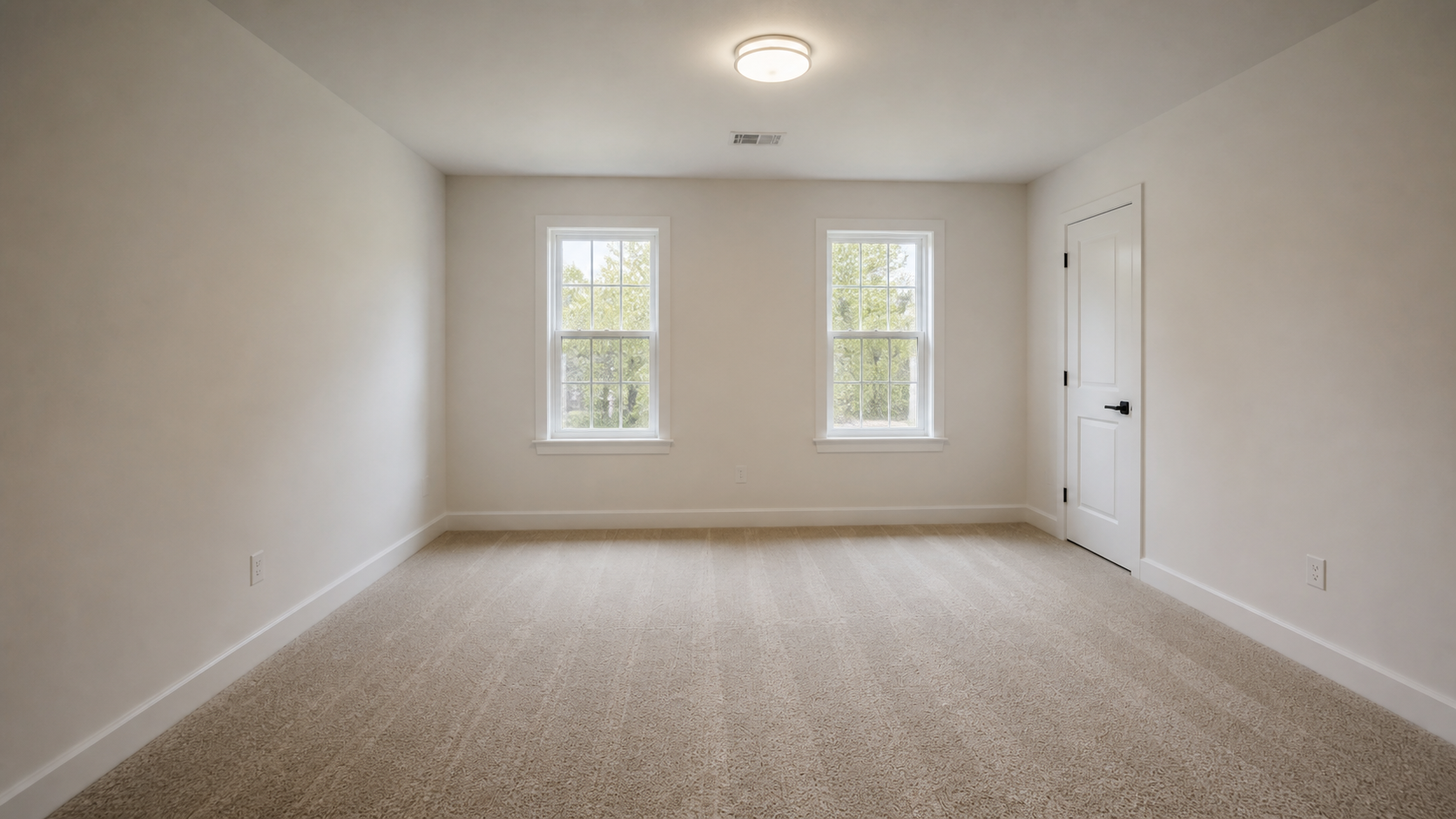
A clear original bedroom photo gives the staging workflow enough room structure to preserve.

The final staged image should still match the original walls, windows, flooring, and room dimensions.
What Software Is Used for Virtual Staging?
Virtual staging software usually falls into three groups.
| Option | Best for | Watch out for |
|---|---|---|
| AI virtual staging tool | Fast previews, style testing, simple vacant rooms, listing workflow speed | Every result still needs review for scale, structure, and disclosure |
| Manual virtual staging service | Premium listings, difficult room angles, consistent style across several photos | Usually slower and often priced per finished image |
| General photo editing software | Designers who can handle masking, perspective, shadows, and furniture assets | More skill and time than most agents want to spend |
| Physical staging | In-person showings, luxury presentation, seller expectations | Costs, logistics, scheduling, rental, delivery, and removal |
AI virtual staging tools
AI tools generate staged previews from an uploaded room photo. They are useful for speed, iteration, and lower-cost experimentation. They still require human review.
Manual virtual staging platforms
Manual services use human designers or editors to create finished staged images. They may be better when a listing is complex, premium, or needs consistent style across multiple room angles.
General photo editing tools
Tools such as Photoshop can be used for virtual staging, but they require design skill, image editing skill, furniture assets, perspective matching, shadows, masking, and careful review. For most agents, a purpose-built staging workflow is faster.
Can ChatGPT do virtual staging? A chat assistant can help plan staging ideas, write prompts, review disclosure language, or create listing copy. Whether it can produce the final edited photo depends on the image tools available in the product you are using. For publishing-ready listing photos, use a workflow designed for real estate images and review the result before export.
FAQ
What is virtual staging?
Virtual staging is the process of digitally adding furniture, decor, and other movable design elements to a real estate photo so buyers can understand how a room could be used.
What is virtual staging in real estate?
In real estate, virtual staging is used for listing photos, seller presentations, rentals, and online property marketing. It helps empty or under-furnished rooms feel easier to understand while preserving the real property features.
What does virtual staging mean?
Virtual staging means a room was digitally furnished after the photo was taken. The image should still represent the same room structure, layout, windows, walls, flooring, and permanent fixtures.
How does virtual staging work?
You upload a room photo, choose a room type, choose a staging style, generate or order the staged version, review the before and after, then export and disclose the final image according to applicable rules.
Is virtual staging worth it?
It can be worth it when it helps buyers understand a vacant or confusing room. It is less useful when a room is already well furnished, when the source photo is poor, or when the staged result creates unrealistic expectations.
Does virtual staging work?
Virtual staging works best as a visualization tool. It can make an empty room easier to interpret online, but it does not replace pricing strategy, property condition, photography quality, or honest disclosure.
Does virtual staging help sell a house?
It can help support listing presentation by making rooms easier to visualize. It should not be treated as a guaranteed way to increase sale price or reduce days on market.
Is virtual staging legal?
Virtual staging is commonly allowed, but rules vary. Check MLS, brokerage, portal, and local requirements. Keep original photos, disclose staged images when required, and do not change or hide material property features.
How much does virtual staging cost?
Costs vary by AI tool, manual service, export quality, revisions, and number of rooms. For a full breakdown, see the virtual staging cost guide.
Can I do virtual staging myself?
Yes. DIY virtual staging can work for clear, empty rooms and simple listing needs. Review the result carefully for scale, realism, structure, and disclosure before publishing.
What software is used for virtual staging?
Agents may use AI virtual staging tools, manual virtual staging services, or advanced photo editing software. For most listing workflows, purpose-built real estate staging tools are faster than general design software.
Can ChatGPT do virtual staging?
A chat assistant can help write prompts, explain staging options, or draft listing copy. Finished virtual staging images require image editing or image generation tools, and the output still needs review before publication.
Bottom Line
Virtual staging is most useful when it makes a real room easier to understand.
For agents and sellers, the goal is not to create the most dramatic image possible. The goal is to show a realistic, buyer-friendly use for the space while keeping the listing accurate. Keep original photos, avoid changing permanent property features, disclose staged images when required, and review every output before publishing.
If you want to test the workflow, start with one clear room photo in the AI virtual staging tool. Stage the room, compare before and after, then decide whether the image is ready for HD export, listing copy, or a broader marketing workflow.